








SysTools SQL Recovery Tool for Windows
- Paid
- 4.5
- V14.0.0
Download for Windows
View an ad to download for free

- SysTools Software
- More programs (31)
Repair Corrupt MDF & NDF Files While Preserving Data Integrity
SysTools SQL Recovery Tool is an advanced software solution designed to repair and recover corrupted Microsoft SQL Server database files (MDF and NDF) without compromising data integrity. Whether database corruption is caused by hardware failures, unexpected system shutdowns, virus attacks, software conflicts, storage media issues, or human errors, the tool provides a reliable way to restore inaccessible SQL Server databases.
The software supports databases created in SQL Server 2025 and all earlier versions, making it suitable for database administrators, IT professionals, organizations, and individual users who need a dependable SQL Server recovery solution.
Key Features
Repair Corrupt MDF and NDF Files: Repair severely corrupted primary (MDF) and secondary (NDF) SQL Server database files while preserving the original database hierarchy and structure. The tool recovers database along with database objects like tables, views, triggers, stored procedures, etc.
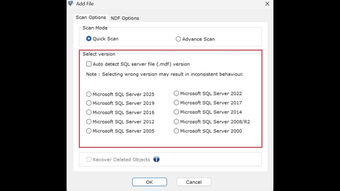
Dual Scan Modes: Choose between Quick Scan for minor corruption and Advanced Scan for severely damaged database files to maximize recovery success.
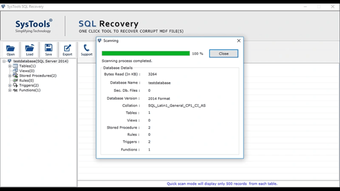
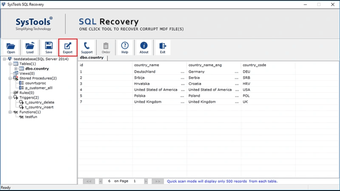
Preview Recovered Data: Preview all recoverable database objects before exporting them. The preview feature helps verify recovered data and ensures accurate restoration.
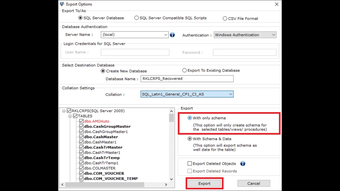
Export to Live SQL Server: Directly export recovered database objects to a live SQL Server instance without requiring additional conversion tools.
Save Recovery as SQL Scripts or CSV: Generate SQL Server-compatible scripts that can be executed later to recreate the recovered database on any supported SQL Server instance. The tool also allows users to save the recovered data as a CSV file for efficiency.
Preserve Data Integrity: The software maintains table relationships, schema, formatting, metadata, and database structure throughout the recovery process.
Recover Deleted Records: Recover accidentally deleted records and inaccessible database objects whenever they are recoverable from the damaged database file.
Support for Large Database Files: Efficiently process and recover large SQL Server databases without compromising recovery accuracy or performance.
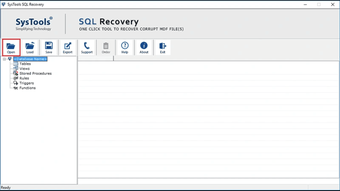
User-Friendly Interface: An intuitive graphical interface guides users through the recovery process, making the software suitable for both experienced database administrators and first-time users.
Comprehensive Compatibility: Supports Microsoft SQL Server 2025, 2022, 2019, 2017, 2016, 2014, 2012, 2008 R2, 2008, 2005, and earlier versions.
Detailed Recovery Preview: Displays recovered database objects in a structured tree view, allowing users to inspect individual objects before exporting.
Safe and Read-Only Recovery: The recovery process is completely read-only and never modifies the original SQL Server database files, ensuring complete data safety.
Benefits of SysTools SQL Recovery Tool:
Repair inaccessible SQL Server databases quickly.
Recover maximum data from corrupt MDF and NDF files.
Minimize database downtime.
Maintain database integrity and object relationships.
Recover data without requiring extensive technical expertise.
Suitable for enterprise databases as well as small business environments.
Reliable recovery from multiple corruption scenarios.
Loading…
App specs
Developer
- SysTools Software
- More programs (31)
License
Full
Version
14.0.0
Latest update
Platform
Windows
OS
Windows Server
Language
English
Size
9.32 MB
Program available in other languages
SysTools SQL Recovery Tool for PC
- Paid
- 4.5
- V14.0.0
Download for PC
View an ad to download for free
User reviews about SysTools SQL Recovery Tool
Have you tried SysTools SQL Recovery Tool? Be the first to leave your opinion!
Add reviewTop downloads Database for Windows
Top downloads Database for Windows
Top downloads Database for Windows
Related topics about SysTools SQL Recovery Tool
Latest articles

The new The Walking Dead game now has a release date

Villanova University study: AI fiction scores higher, but human labels win trust

Europe is still winning the AI boom in 2026: just not in foundation models

Android Auto comes to boats in 2027: Crest and Balise first

SpaceX’s Starship Flight 14 targets its first tower catch this month
Laws concerning the use of this software vary from country to country. We do not encourage or condone the use of this program if it is in violation of these laws. Softonic may receive a referral fee if you click or buy any of the products featured here.